Google Ads campaigns fail to generate leads for one of three reasons: the campaign is attracting the wrong traffic, the landing page is not converting the right traffic, or conversions are happening but not being tracked.
It is a chain of small misalignments between what the user searches, what the ad promises, what the landing page delivers, and what the tracking captures. Break the chain in the wrong place and you waste weeks of optimisation.

The 3 Real Causes of Google Ads Lead Failure
Across the paid search accounts we audit at SOMO, low lead volume almost always sits in one of three buckets.
Naming them up front makes diagnosis faster. It also prevents the most common mistake we see: optimising the wrong layer first.
- Traffic quality. The ads are showing the wrong searches.
- Conversion experience. The right traffic arrives, but the page or offer fails to convert it.
- Tracking and measurement. Leads are happening but not recorded, so the bidding algorithm cannot learn.
A campaign can fail on one of these or all three. The diagnostic order below assumes you check tracking first, because every other decision you make depends on the data being correct.
1. Traffic Quality: Are Your Ads Reaching Buyers?
The Search Terms report is the single most underused diagnostic in Google Ads.
It tells you the actual queries that triggered your ads, not the keywords you bid on. The two are rarely the same once a broad match is involved.
How to Use the Search Terms Report to Find Wasted Ad Spend?
Open Google Ads, then go to Insights and reports > Search terms.
Look for two specific patterns of waste:
- Informational queries with no buying intent (‘how does X work’, ‘X meaning’, ‘free X’)
- Job-seeker, student, or competitor-research queries (‘X jobs’, ‘X salary’, ‘X vs Y’, ‘reviews of X’)
Add every irrelevant term to a shared negative keyword list at account level, not just within the campaign. We routinely cut wasted spend by 15% to 30% from a single sweep of this report on a neglected account.
Account-level lists scale across campaigns and keep new campaigns clean from day one. Campaign-level negatives leave you fixing the same problem twice.
Why Broad Match Fails Without Enough Conversion Data?
Broad match needs Smart Bidding plus a healthy conversion signal to perform. Google’s own documentation states this.
If you have switched a campaign to broad match without target CPA or target ROAS active, the system has no signal to optimise against. It will spend on volume rather than quality.
The minimum we work with before turning broad matches on is 30 conversions in the previous 30 days. Below that threshold, switch to phrase match while the conversion signal builds.
This is a frequent finding when clients tell us their campaigns ‘used to work’. The change that broke them is almost always a premature shift to broad match plus Smart Bidding before the data was ready.
Why Your Geographic Targeting May Be Too Wide?
Two settings hide here that quietly damage performance for local lead generation:
- ‘Presence or interest’ targeting is the default. It shows your ads to anyone interested in your locations, not just people in them. For local services, switch to ‘Presence’.
- Audience exclusions for current customers, job applicants, and irrelevant demographics tighten the funnel further. Most accounts we audit have none applied.

2. Landing Page and Offer: Does the Click Convert?
A campaign with strong targeting but a weak landing page is the most common pattern in accounts that show ‘lots of clicks, no leads’.
This is also where most agencies stop diagnosing. The campaign settings look fine, the budget is healthy, so the assumption is the market has shifted. It rarely has. The problem is usually that the click never had a chance to convert.
Why Your Ad and Landing Page Must Say the Same Thing
The headline of the landing page should restate the headline of the ad, almost word for word.
When the two diverge, bounce rate climbs above 70% and Quality Score collapses. We find this issue on roughly half the accounts we audit.
The fix is mechanical:
- Align the ad H1 to the landing page H1
- Remove navigation that takes the user away from the conversion goal
- Mirror the offer phrasing in the form headline (‘Book your free assessment’ not ‘Submit enquiry’)
Quality Score matters here beyond the obvious. A higher Quality Score lowers your CPC for the same ad position, which means message match alone can return the budget you are currently giving to Google.
How Slow Page Speed Loses Google Ads Conversions
A landing page that loads in over 3 seconds on mobile loses approximately 50% of users before the form is visible (Google, web.dev).
Run the URL through PageSpeed Insights. The two thresholds that matter:
- LCP (Largest Contentful Paint) under 2.5 seconds
- CLS (Cumulative Layout Shift) under 0.1
If either fails on mobile, the page is leaking conversions before the form even renders. Compressing hero images and lazy-loading below-fold content fixes most LCP issues without a full rebuild.
How to Fix a Landing Page That Is Underperforming Benchmarks
A weak offer is a strategic problem, not a technical one.
If the form asks for 12 fields, requires a phone number for a low-commitment query, or buries the CTA below the fold, conversion rate will sit below industry benchmarks no matter how good the traffic is.
What counts as ‘below benchmark’ depends on context: 2% is poor for a branded campaign but acceptable on a competitive generic one.
The principle holds either way. The form is losing conversions that the traffic should be earning.
The strongest fixes:
- Reduce form fields to 3–5 (name, email, phone, postcode, query type)
- Surface a single primary CTA above the fold
- Add social proof (review count, star rating, recognisable client logos) close to the form
- Match the offer to the search intent (a ‘free quote’ offer for ‘cost’ searches; a ‘book consultation’ offer for ‘near me’ searches)
3. Conversion Tracking: Are You Counting What Counts?
Before you change a single bid or keyword, verify that the campaign is actually recording the leads it generates.
This is the most common ‘invisible’ cause of poor performance, and we see it constantly.
How to Check If Your Google Ads Conversion Tracking Is Broken
Install Google Tag Assistant in Chrome. Walk through the conversion path as a real user.
- Submit the form on desktop and mobile
- Click the call button on mobile
- Check the Tag Assistant panel to confirm the conversion event fires
If the tag does not fire, the campaign is invisible to the bidding algorithm. We find broken or missing conversion tags on roughly 40% of the accounts that come to us reporting ‘no leads’ from Google Ads.
The leads are landing in inbox. The platform has no way of knowing which clicks generated them, so it cannot optimise toward more of the same.
Which Google Ads Conversions Should Be Set as ‘Primary’?
A single primary conversion (form submission or phone call) drives Smart Bidding most reliably.
Counting newsletter signups, scroll depth, or button clicks as primary conversions teaches the algorithm to optimise for low-value actions. The campaign looks like it is working in dashboards, while the phone stays quiet.
Move soft signals to ‘Secondary’ and reserve ‘Primary’ for genuine lead events. If you sell to a long sales cycle, look at uploading offline conversions from your CRM so the bidder learns which leads actually closed.
This last point is what separates B2B campaigns that generate leads from B2B campaigns that generate qualified leads. Without offline conversion uploads, Smart Bidding optimises toward whoever fills out the form, not whoever buys.
How to Diagnose Your Google Ads Lead Problem in 5 Steps
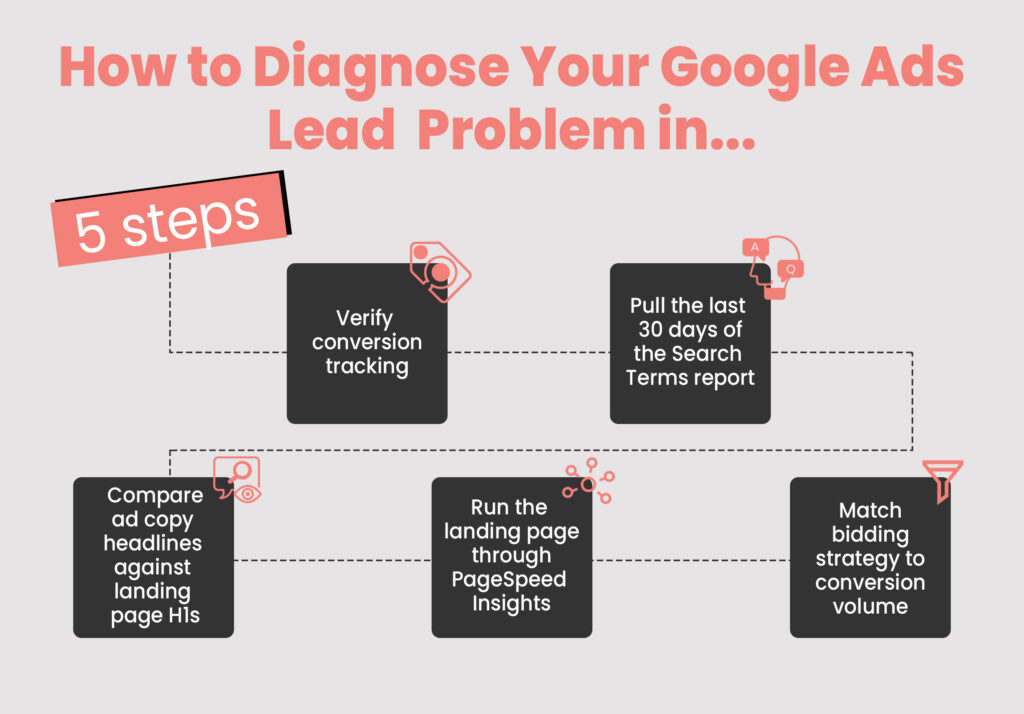
Use this order. It saves time and avoids the common mistake of optimising bids while tracking is broken.
- Verify conversion tracking using Google Tag Assistant on mobile and desktop.
- Pull the last 30 days of the Search Terms report and add irrelevant queries to a negative keyword list at account level.
- Compare ad copy headlines against landing page H1s for message match.
- Run the landing page through PageSpeed Insights and confirm Core Web Vitals pass on mobile.
- Match bidding strategy to conversion volume. Avoid Smart Bidding under 30 monthly conversions.
If you have worked through all five and performance has not improved over a full conversion cycle, the next layer to examine is the offer and the market.
One of the clearest demonstrations of this sequencing principle in our portfolio is Diverse Garage, a Western Sydney smash repairer.When they came to SOMO, they had no paid media strategy and a Wix site that was not mobile-responsive. Customers were finding them mainly through word of mouth, despite over 200 five-star Google reviews.What worked was the order of work: tracking and a mobile-responsive site rebuild came first; the customer funnel across Meta, Google, and email was mapped second; email automation was built third; Google Search Ads launched last with hyperlocal geo-targeting to their highest-converting suburbs.The results across the engagement: +110% monthly website leads, Google Ads conversion rate from 4% to 11%, and CPC down 40%. The single biggest lever was sequencing. Every account we have seen attempt this in reverse – ads first, foundations later – has wasted budget for months before fixing the same fundamentals.
When the Problem Is Not the Campaign
Some lead shortfalls are genuinely external. Three factors we see regularly across SOMO’s paid search accounts:
- Seasonal demand drops. These show clearly in Google Trends for the primary keyword. If demand has fallen industry-wide, the campaign is performing relative to a smaller pool.
- Slow sales follow-up. Leads sit in inbox while the prospect contacts a competitor.
- Competitor entry or aggressive bidding. This drives CPCs up without an offer adjustment to match. Auction Insights will show this clearly.
Auditing these three before blaming the campaign saves hours of work on the wrong problem.
Frequently Asked Questions
How long should it take for Google Ads to start generating leads?
A new Google Ads campaign typically needs two to four weeks to produce stable lead volume, assuming conversion tracking is correctly installed and the campaign is running on an adequate daily budget for its industry and competition. For smaller local brands, AU$60 to AU$100 daily is usually a workable starting point. Larger companies and more competitive industries will typically need significantly more before lead volume stabilises. The first seven days are the learning phase, during which Smart Bidding and Quality Score data are collected. Performance before day 14 is rarely representative. If you see no conversions at all after 14 days at adequate budget, the issue is almost always tracking or targeting, not the learning phase.
Why am I getting clicks but no conversions on Google Ads?
Clicks without conversions point to one of three things: the search terms attracting the clicks have no buying intent, the landing page is not aligned to the ad message, or conversions are firing but not being recorded. Pull the Search Terms report first, then check message match between ad and landing page, then verify the conversion tag with Google Tag Assistant. In our experience, around 60% of these cases are tracking or targeting issues, not creative ones.
Are negative keywords really that important for lead generation?
Yes. Negative keywords are the single fastest lever for improving lead quality on Google Ads. Without them, broad match and even phrase match keywords show your ads to informational, navigational, and competitor searches that rarely convert. We typically add 50 to 200 negative keywords during a campaign rebuild, drawn from the Search Terms report and from research-intent qualifiers (‘how’, ‘why’, ‘meaning’, ‘free’, ‘jobs’, ‘salary’, ‘reviews of’).
Should I use Smart Bidding or Manual CPC for lead generation?
Smart Bidding (specifically Maximise Conversions or target CPA) outperforms Manual CPC for lead generation once a campaign has logged at least 30 conversions in the previous 30 days. Below that volume, Manual CPC or Maximise Clicks gives the algorithm time to gather signal without spending against thin data. Switching to Smart Bidding too early is one of the most common reasons campaigns appear to ‘stop working’ after a strategy change.
Can a low budget be the reason my Google Ads are not generating leads?
A low daily budget can suppress lead volume, but it is rarely the root cause when leads are zero rather than just low. If the campaign is showing impressions and getting clicks at a normal cost per click, the budget is not the constraint. If ‘Search impression share lost (budget)’ in the Auction Insights report is over 50%, raising the budget is justified. Otherwise, look at targeting, landing page, and tracking before increasing spend.
What is a good conversion rate for Google Ads lead generation?
The benchmark for a Google Ads search campaign in lead generation sits between 3% and 6%, depending on industry. Legal, finance, and B2B SaaS typically sit at the lower end (2% to 4%). Local services such as trades, healthcare, and home improvement sit at the higher end (5% to 9%). A conversion rate below 2% signals either poor traffic quality, weak message match, or a landing page that does not load or convert reliably on mobile.
How do I know if my Google Ads conversion tracking is set up correctly?
The fastest check is the Tag Assistant Companion extension in Chrome. Visit your landing page, complete the form or click the call button, and confirm the conversion event fires in the Tag Assistant panel. Inside Google Ads, the Conversions column should show a green tick under ‘Status’. If you see ‘No recent conversions’ or ‘Tag inactive’ on a campaign that is generating clicks, the tag is broken and the entire bidding algorithm is operating blind.
A Google Ads campaign that does not generate leads is almost always solvable inside the account, provided the diagnosis happens in the right order. Start with tracking, move to traffic, finish with the landing page. Skipping or reversing those steps is how good campaigns get killed off too early.
If your audit reveals the campaign needs to be rebuilt rather than optimised, the structural decisions that follow – campaign type, keyword match, audience signals, conversion goals – are covered in our companion piece on how to build Google Ads campaigns that actually generate leads.
If you want a second pair of eyes on a campaign that has gone quiet, our paid media team runs free 30-minute Google Ads audits and can usually identify the dominant issue inside one screen-share. Talk to our Paid Search team →